On site across Algeria
Backup of your machines’ programs
A PLC, an HMI screen or a drive holds a program or settings made for your machine. If the device fails and nobody has a copy, the machine stays stopped while the program is rebuilt, when that is possible. We come to your site, back up the programs and parameters, and hand you the files sorted and labelled, before a breakdown happens.
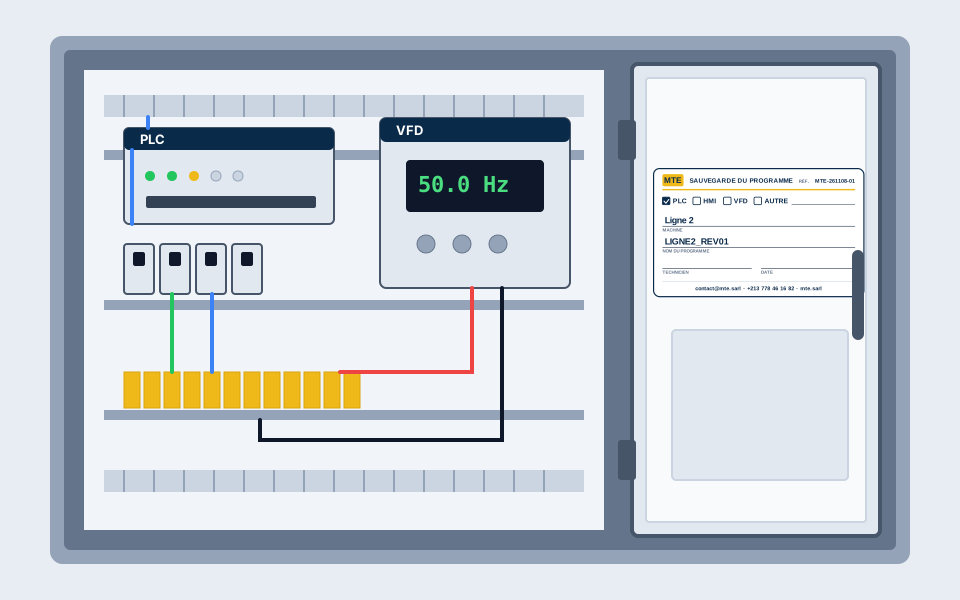
The label left in the cabinet
When the door opens, you see at once which device, which program, who backed it up, when, and who to call.
What we back up
- The program of each PLC, when the PLC allows it to be read
- The project of each HMI screen
- The parameters of each drive and servo drive
- The communication settings noted down: IP addresses, Modbus, Profinet
How the backup goes
- You send us photos of the cabinet and devices on WhatsApp, or we come and look
- We give you a free quote before any work
- We work on site, around your production stops
- We hand over the files and the inventory at the end
What you get
- One folder per machine: programs, HMI projects, drive parameters, date and software versions
- A label inside the cabinet with the program name and the backup date
- The files handed over by e-mail and on a USB stick
- A list of the devices backed up, and of those that could not be, with the reason
Brands and software
- Siemens S7-200/300/1200/1500
- Siemens LOGO!
- Schneider Modicon
- Schneider Zelio
- Omron
- Fatek
- LS (XGB/XGT)
- Xinje
- Delta
- Mitsubishi
- ABB
- Schneider Altivar
- Siemens Sinamics
- Danfoss
- LS
- INVT
How it works
- 1
You describe the machine or the project by phone, WhatsApp or with the form (photos and part numbers welcome).
- 2
We study the need and send you a free quote before any work.
- 3
We work on site or in the workshop, with tests and a backup handed over at the end.

Frequently asked questions
My PLC is password-protected: can you still back it up?
It depends on the brand, the model and the type of protection. If the PLC allows reading, we back up the program. If not, we back up what is accessible (HMI screen, drives, settings) and we tell you before we start. We do not bypass a protection set by your machine’s builder without their agreement.
What should we prepare before the visit?
The list or photos of the devices, access to the cabinet and, if possible, a moment when the machine can stop: some readings need the PLC stopped for a few minutes. We agree on it together before starting.
Do the files belong to me?
Yes. The files are yours, and you can give them to another technician. We use them only for your project and never publish them.
How much does the backup cost?
The price depends on the number of devices and the travel. Send us photos of the cabinet on WhatsApp: the quote is free and you receive it before any work.
What happens if the PLC fails later?
With the backup, a replacement PLC can be loaded with the program, without rebuilding it. You can call us for the work (on a quote) or give the files to another technician.
Our other services
- PLC programming
- HMI and SCADA programming
- Factory SCADA supervision
- Pumping station remote monitoring
- VFD and servo set-up
- Injection moulding machines
- CO2 laser and CNC machine repair
- Migration and modernisation
- Electrical design and instrumentation
- Generator installation and repair
- Maintenance contract
- All our services
Tell us about your machine
Quick answer by phone or WhatsApp, free quote before any work, anywhere in Algeria.